
Read product analytics
Look at one product at a time so you can understand what is working and what needs attention.
Product analytics are where broad account numbers become specific. If one product is driving sales, refunds, or support questions, this page helps you see it without mixing every product together.
Use this page when you are deciding whether to improve copy, adjust pricing, add discounts, replenish license keys, or change the way you promote a product.
Before you start
- Create at least one product.
- Product analytics become richer after checkout activity begins.
Understand one product
-
01
Scan the product summary
Start with the product-level metrics so you know whether the product is active, quiet, refund-heavy, or delivery-heavy.

-
02
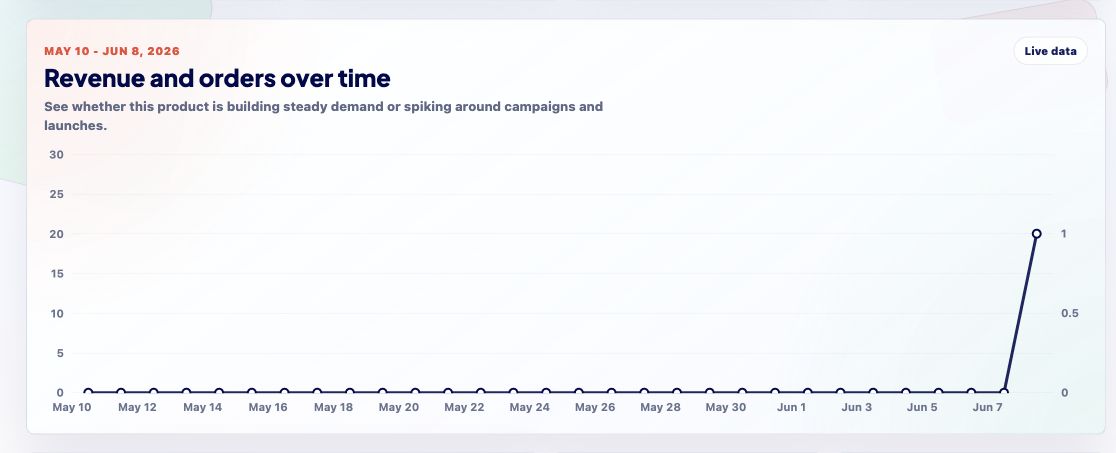
Use the chart for timing
Charts show when sales or activity happened. That helps connect performance to launches, emails, discount codes, or changes you made on your site.
-
03
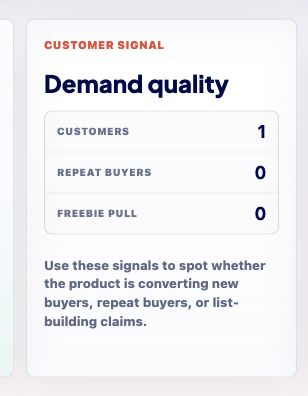
Read product signals
Signal panels surface setup or performance issues that deserve action, such as missing delivery pieces, refund patterns, or license inventory concerns.
-
04
Improve one thing at a time
Use the data to choose one next improvement: price, checkout copy, discount strategy, delivery email, or the product page itself. Small focused changes are easier to learn from.
Good to know
- If a product is not selling, inspect the checkout button, product page, delivery promise, and discount strategy together.